Game Modes, Hub Pads, and Ranked Ladders
Aero organizes match entry into three distinct systems: Quick Play, Casual hub pads, and Ranked ladders. Depending on how you queue, you can enter Free-For-All sessions or team formats ranging from 1v1 up to 5v5. Choosing the right entry point depends on your party size and whether you want casual practice or ladder progression.
Quick Play Match Formats
Quick Play serves as the direct menu route into standard matches without walking across the lobby floor. The official description confirms that Quick Play supports Free-For-All sessions alongside head-to-head team formats scaling from 1v1 to 5v5. In historical gameplay recorded by PixelatedBread89 on 23 November 2026, a central Play button appeared at the bottom of the screen to open match selection.
While the hub layout can change after visual overhauls, looking for the primary Play prompt on your main HUD remains the fastest way to reach Quick Play. Solo players can select Free-For-All or 1v1 to practice movement without relying on teammates. Groups should choose the team bracket that matches their active party count up to five players.
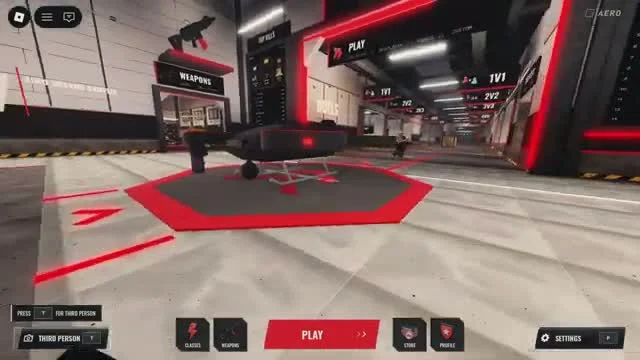
Casual Hub Queue Pads
Instead of using a menu screen, Casual mode uses physical queue pads located inside the spawning hub. Players walk their characters onto marked zones on the lobby floor to join an upcoming match with others standing on the same pad. The 23 November 2026 gameplay recording showed an older grey and red lobby with physical zones and overhead signage, though the current environment has undergone an overhaul.
- Load into the main Aero hub and look around the lobby floor for marked queue pads.
- Check the overhead display or pad label to see the team size and current player count.
- Step onto the pad with your character and wait for the participant slots to fill.
- Watch the top of your screen once teleported for the round countdown timer and team score display.
Ranked Ladders and Tiers
For competitive play, Aero features a dedicated Ranked mode divided into three separate ladders. Across these ladders, players climb through rank tiers starting at Bronze and progressing up to the highest tier, named AERO. The official game listing does not specify the exact team sizes assigned to each of the three ladders or the level requirement to unlock competitive queuing.
Furthermore, Noctornal Studio has not published the underlying rating formula or the exact point totals needed to promote between intermediate tiers. When you open the Ranked selection screen, inspect the three ladder tabs directly in the UI to verify which format each ladder represents. Read the displayed tier and any progress information before joining; a tier emblem alone cannot establish the points needed for promotion.
Win Streaks and Round HUD
Winning consecutive matches builds a win streak on your account. The developer confirms that players can build and flex their win streak, making streak preservation an ongoing goal across both casual and competitive sessions. Once a match loads, as seen at the 00:10:00 mark of the November 2026 gameplay video, the top HUD displays the round countdown and active team scores.
Keep an eye on the top score display to know whether your team needs to play for time or score additional points before the clock expires. Read the selected format and participant requirements before confirming the queue. The official description does not establish whether streaks transfer between every queue.