Account Progression, Loadouts, and Skins Guide
Account progression in Aero links your player level directly to gameplay unlocks while offering cosmetic customization through skins. Leveling up unlocks new guns and classes for your loadout, whereas weapon skins alter visual appearance with custom sounds and auras. Reading the inventory interface helps you track locked equipment, available Credits, and cosmetic cards.
Leveling Up for Guns and Classes
The primary progression path in Aero is raising your account level by completing matches across Quick Play, Casual, or Ranked queues. Official game documentation confirms that leveling up is how players unlock new guns and new classes. Because Noctornal Studio does not publish an official experience point table or exact level thresholds for each weapon, your in-game inventory serves as your progression tracker.
Whenever you finish a session and return to the lobby, check your loadout screen to see if new equipment has cleared its level gate. Focusing on modes you enjoy keeps your match completion rate steady without needing to worry about hidden experience formulas.
Reading the Loadout and Inventory UI
Historical gameplay footage recorded by PixelatedBread89 on 23 November 2026 provides a clear reference for how Aero structures its equipment menus. At the 00:02:00 timestamp, opening the weapons menu reveals a dedicated Weapons tab displaying a grid of item cards. Unacquired guns display a padlock icon over the card, while clicking any card highlights it and loads its specific information into a side detail panel.
- Enter the weapons or loadout menu from the lobby screen or hub sign.
- Scan the item grid to separate available gear from cards marked with a padlock icon.
- Select a highlighted card to inspect its current status in the detail panel.
- Check your numerical Credits balance displayed inside the menu header or corner.
- Click the BACK TO HUB button when you are finished adjusting your active equipment.
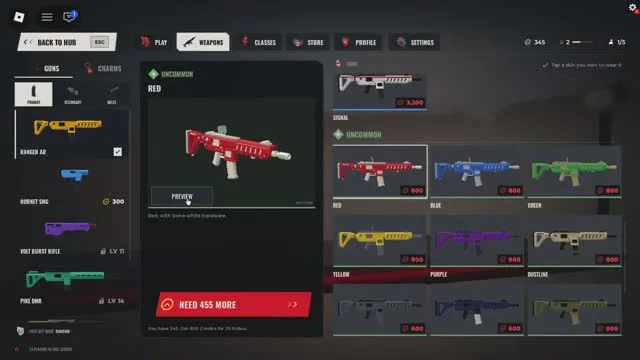
Credits and Card Color Tiers
Alongside level-gated unlocks, the loadout interface tracks an in-game currency labeled Credits, as seen in the November 2026 menu recording. At the 00:06:00 mark of that same recording, the player inventory displays weapon cards with distinct background colors, including blue cards and gold or pink cards. While color coding visually separates different tiers of items or cosmetics in your collection, the recording does not verify exact Credits prices or confirm how currency interacts with level requirements.
Furthermore, colored cards do not indicate guaranteed gameplay superiority, so you should never treat card background color as a performance ranking. When browsing your own inventory after the recent hub overhaul, read the text on the highlighted selection panel to see whether a locked card requires a higher player level or a Credits expenditure.
Weapon Skins, Sounds, and Auras
Cosmetic progression in Aero centers on collecting skins that customize your unlocked weapons. The official description highlights that skins can feature custom sounds and visual auras, allowing you to stand out during matches alongside your win streak. The developer describes sounds and auras, without publishing a guarantee about the gameplay effects of every skin. Read each item description before treating it as cosmetic only.
When you acquire a new skin card in your inventory, select it in the Weapons tab to preview whether it attaches a special aura or audio effect to that firearm. Keeping your favorite skins equipped on your most frequently used guns ensures your cosmetic unlocks are visible in every round.